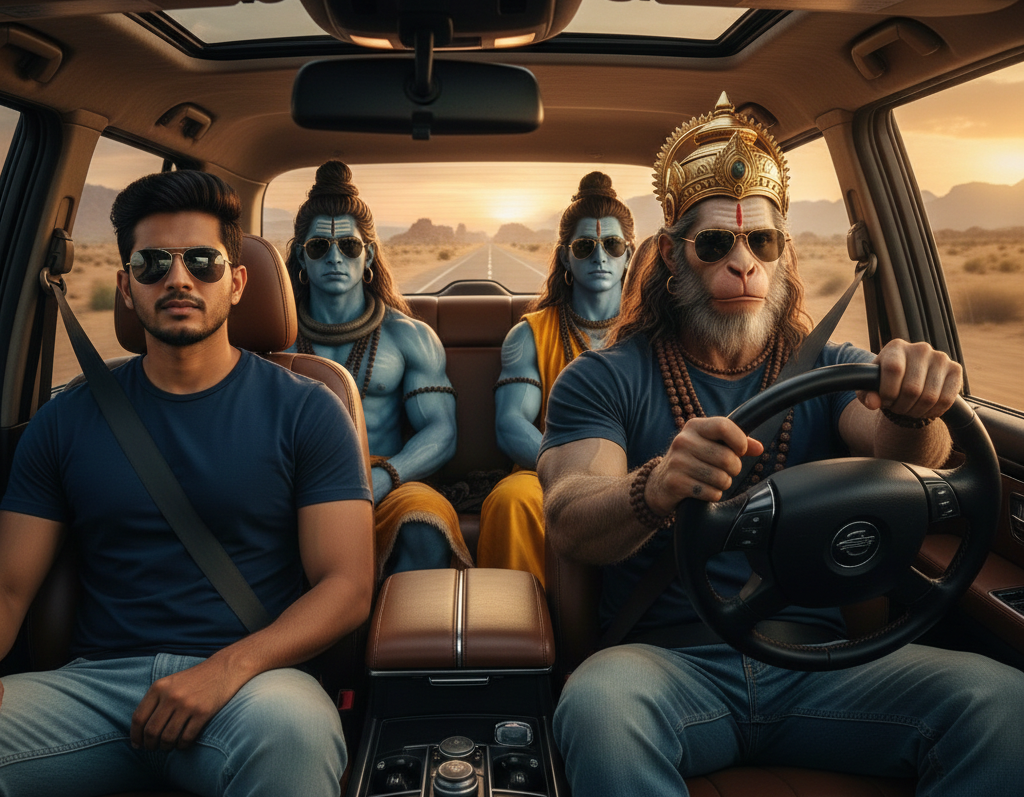
AI-generated God SUV driving videos are one of the most viral visual trends right now. These videos usually show a powerful divine figure—such as Shiva, Ram, Hanuman, Krishna, or a universal god-like presence—calmly driving a luxury SUV through mountains, clouds, or heavenly roads. The visuals feel cinematic, emotional, and spiritually powerful, which is why people love sharing them on Instagram Stories, Reels, YouTube Shorts, and WhatsApp Status.
In this article, you will learn why this trend is viral, how to create god SUV images and videos using AI, and you’ll get ready-to-use photo and video prompts separately for Gemini and Grok Imagine.
Why God SUV Driving Videos Are Going Viral
This trend works because it mixes faith, power, luxury, and emotion in a single visual. People feel a strong emotional connection when they see a god figure portrayed as calm, protective, and powerful, especially while driving a modern SUV.
Another big reason for virality is short-form content behavior. These videos are perfect for stories and reels because they look premium, emotional, and eye-catching even without sound. Many creators add slow bhajans, flute music, or cinematic background scores, making them highly shareable.
Users are not just watching these videos—they are resharing them as a symbol of belief, positivity, and strength, which pushes organic reach even higher.
Advertisements
What You Need to Create God SUV AI Videos
You don’t need any editing skills or expensive software. You only need:
An AI image generator (Gemini or Grok Imagine)
An AI video generator (that supports image-to-video or text-to-video)
A strong prompt (this is the most important part)
Once the base image looks powerful and realistic, converting it into a video becomes very easy.
Step-by-Step Process to Create God SUV AI Content
First, you generate a high-quality photo of a god driving an SUV using AI. This image acts as the foundation. Second, you animate the image into a short cinematic video, adding motion like moving clouds, rotating wheels, light rays, or camera movement. Finally, you upload the video as a reel or story with emotional music.
Now let’s look at separate prompts for photo and video creation.
Advertisements
AI Photo Prompt: God Driving SUV (Use in Gemini or Grok Imagine)
Use this prompt to generate a realistic, cinematic image.
Photo Prompt:
A cinematic, ultra-realistic shot taken from the front view (windshield angle) looking inside a modern luxury SUV during a golden hour sunset. The main subject is a young Indian man [reference image] sitting in the driver’s seat, wearing a light blue shirt and stylish black sunglasses, looking cool and relaxed. Seated in the passenger seat is Lord Hanuman in a divine human form with a powerful physique and golden ornaments. In the back seat are Lord Shiva (with ash marks and rudraksha beads) and Lord Krishna (with a peacock feather crown). All the gods are also wearing stylish black sunglasses, blending a modern vibe with a divine aura. The car windows are open, and warm sunlight floods the cabin. 8K resolution, photorealistic skin texture, sharp focus, natural shadows, and highly detailed reflections.Copy to Clipboard.
You can customize:
Change the god (Shiva, Ram, Krishna, Hanuman, abstract divine figure)
Change SUV style (black luxury SUV, white premium SUV)
Background (mountains, clouds, night sky, sunrise)
AI Video Prompt: God SUV Driving (Image to Video)
After generating the photo, use this video prompt in an AI video generator that supports image animation.
Video Prompt:
All four people inside the car are vibing to music with natural head nodding light shoulder movement subtle hand tapping and relaxed facial expressionsCopy to Clipboard
Keep video length between 5 to 8 seconds. Short videos perform better on stories and reels.
How to Use Gemini for This Trend
Gemini works very well for realistic and detailed images. When using Gemini:
Be very clear about realism and lighting
Use words like cinematic, photorealistic, ultra-detailed
Avoid cartoon or illustration terms
Generate 2–3 variations and pick the one with the best facial expression and car realism.
How to Use Grok Imagine for This Trend
Grok Imagine is great for bold, dramatic visuals. It often produces strong contrast and powerful mood.
Emphasize emotions like calm power, divine presence
Mention dramatic sky, cinematic shadows
Use vertical format keywords for social media
Creators often use Grok for high-impact visuals that instantly grab attention on feeds.
Why These Videos Perform Extremely Well on Stories
Stories are consumed fast, and people love sharing content that reflects belief, motivation, and identity. God SUV videos feel:
Premium and powerful
Emotionally comforting
Visually unique
That’s why many users repost them without even knowing who created them. This creates free organic reach, making the trend perfect for creators, pages, and even traffic arbitrage.
Tips to Increase Virality Even More
Add soft background music like bhajans, flute, or cinematic instrumental tracks. Keep videos short and loop-friendly. Post during early morning or late night when devotional content performs best. Use simple captions like “Faith Over Fear” or “Divine Protection Always”.
Final Thoughts
God SUV driving videos created using AI are not just a trend—they are an emotional visual format that people genuinely enjoy sharing. With the right photo prompt, video prompt, and cinematic style, you can easily create viral content using Gemini or Grok Imagine, even without editing skills.
This trend is especially powerful for Instagram Stories, Reels, and Shorts, and it’s likely to stay viral for a long time because it blends faith, technology, and emotion beautifully.